Step-by-step with screenshots: authorise Last Accounting Company to handle your company’s tax matters (and payroll reporting) via Suomi.fi e-Authorizations.
For LAC to handle your company’s taxes, payroll, and the reads that make both
verifiable, your company grants Suomi.fi mandates to our filing entity. Grant
the full list below in one wizard pass — it takes about five minutes,
selecting everything at once means you never have to come back for a missing
authorisation, and nothing is ever filed without a human review on our side.The Suomi.fi interface is shown in Finnish below; the flow is identical in the
English UI.
Go to suomi.fi/e-authorizations
(Finnish: suomi.fi/valtuudet), press
Identify yourself, sign in, and choose to act on behalf of your
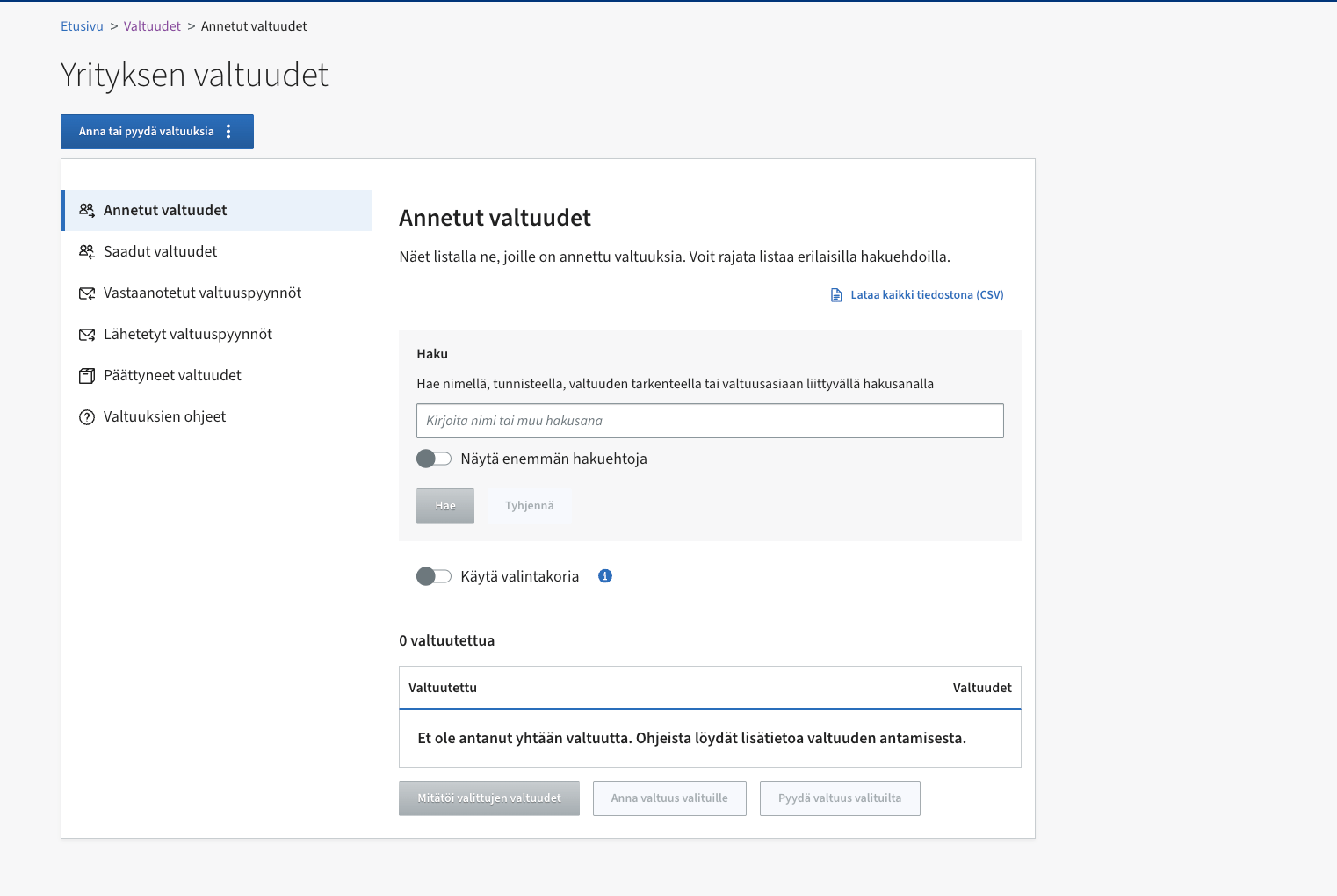
company. You land on Yrityksen valtuudet (Company mandates). Press
Anna tai pyydä valtuuksia → Anna valtuuksia (Grant mandates).
Company mandates — start from “Anna tai pyydä valtuuksia”.
2
Mandate type: Asiointivaltuus
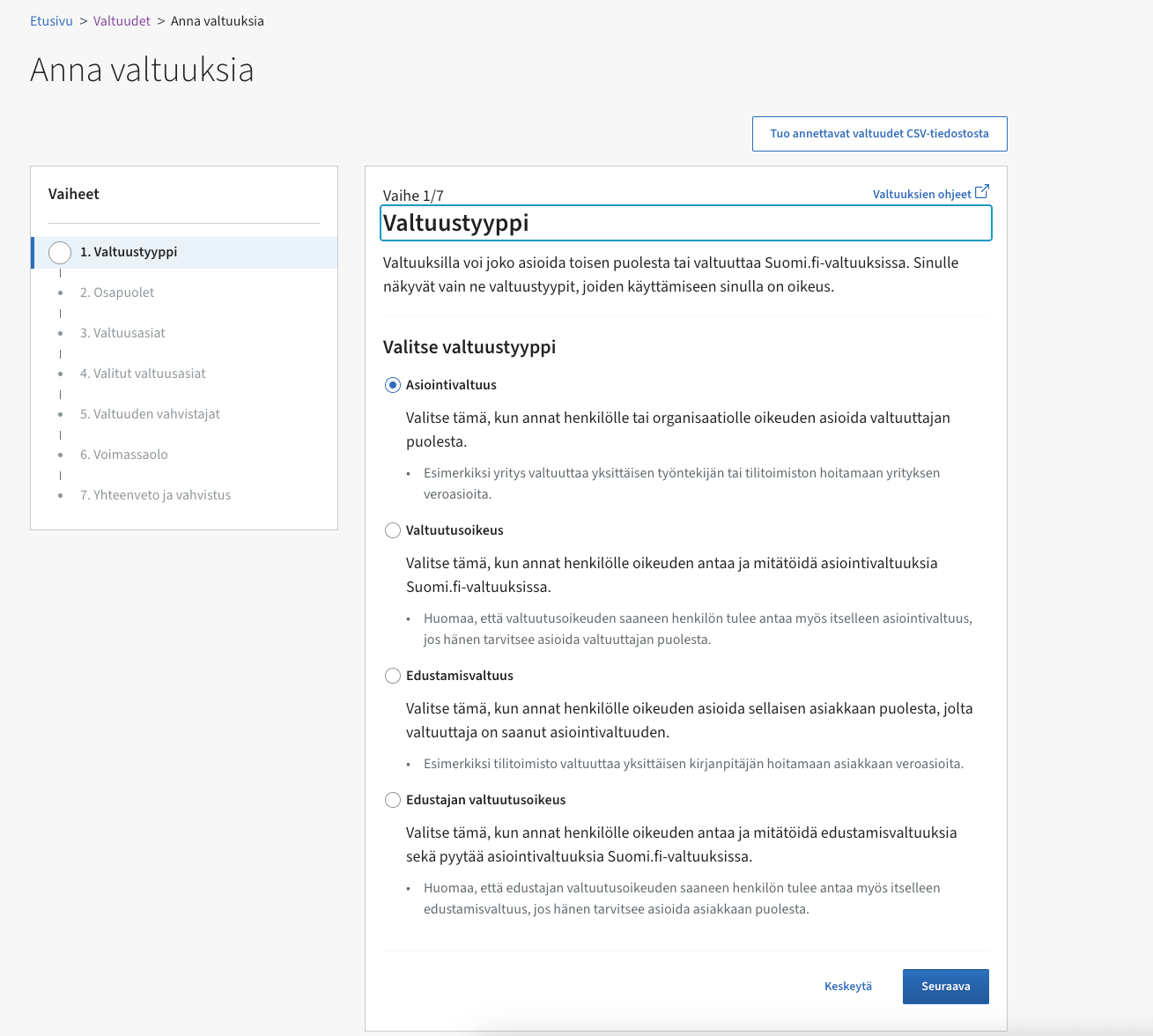
Step 1/7 asks for the mandate type. Pick Asiointivaltuus (mandate for
transactions) — you’re authorising an accounting firm to act on the
company’s behalf.
Step 1/7 — choose Asiointivaltuus.
3
Name LAC as the assignee
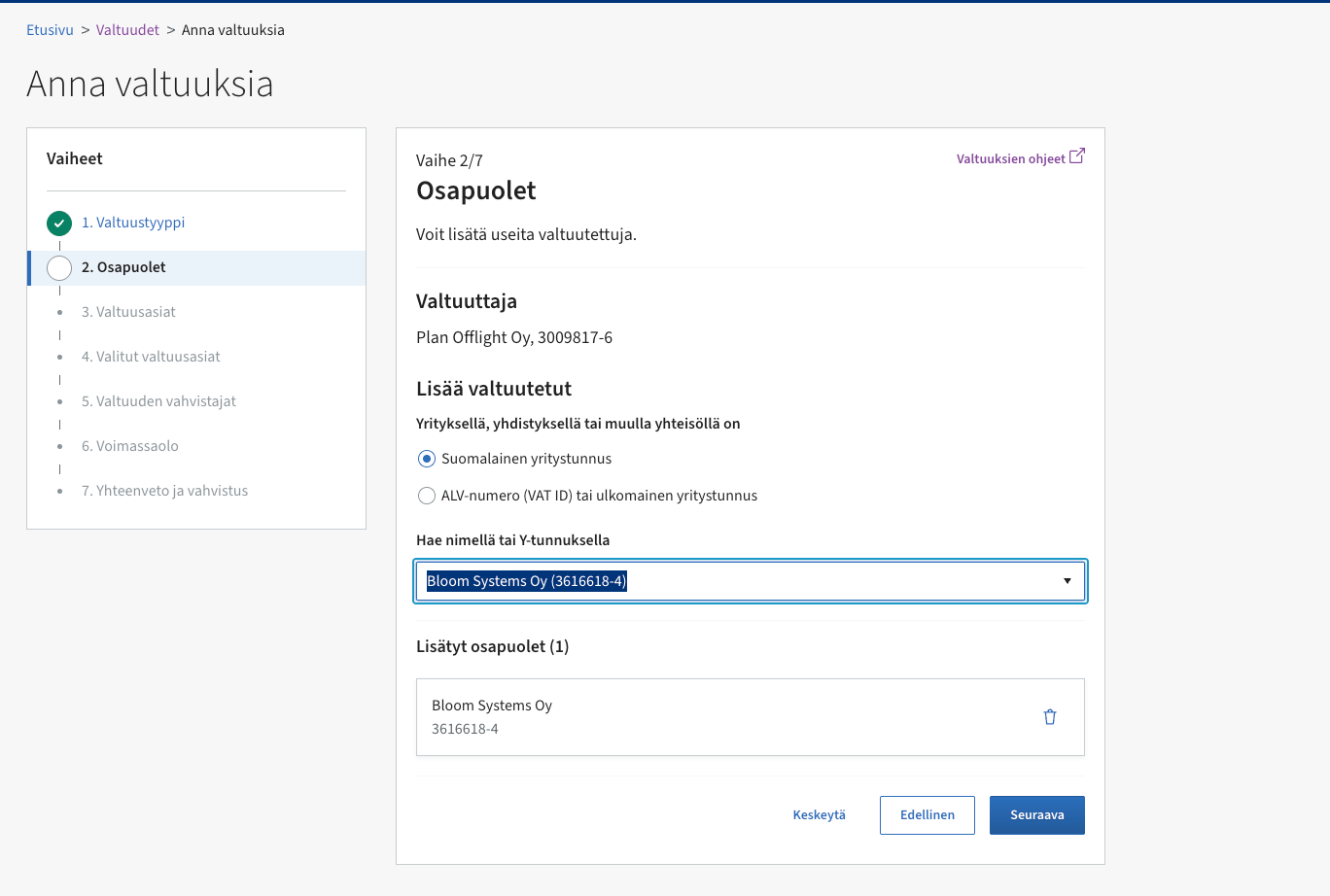
Step 2/7 (Osapuolet, parties): under Lisää valtuutetut, search by
business ID and add:
Name: Bloom Systems Oy (operating as Last Accounting Company)
Business ID (Y-tunnus): 3616618-4
Step 2/7 — add Bloom Systems Oy (3616618-4) as the assignee.
4
Pick the mandate themes — tick the full list
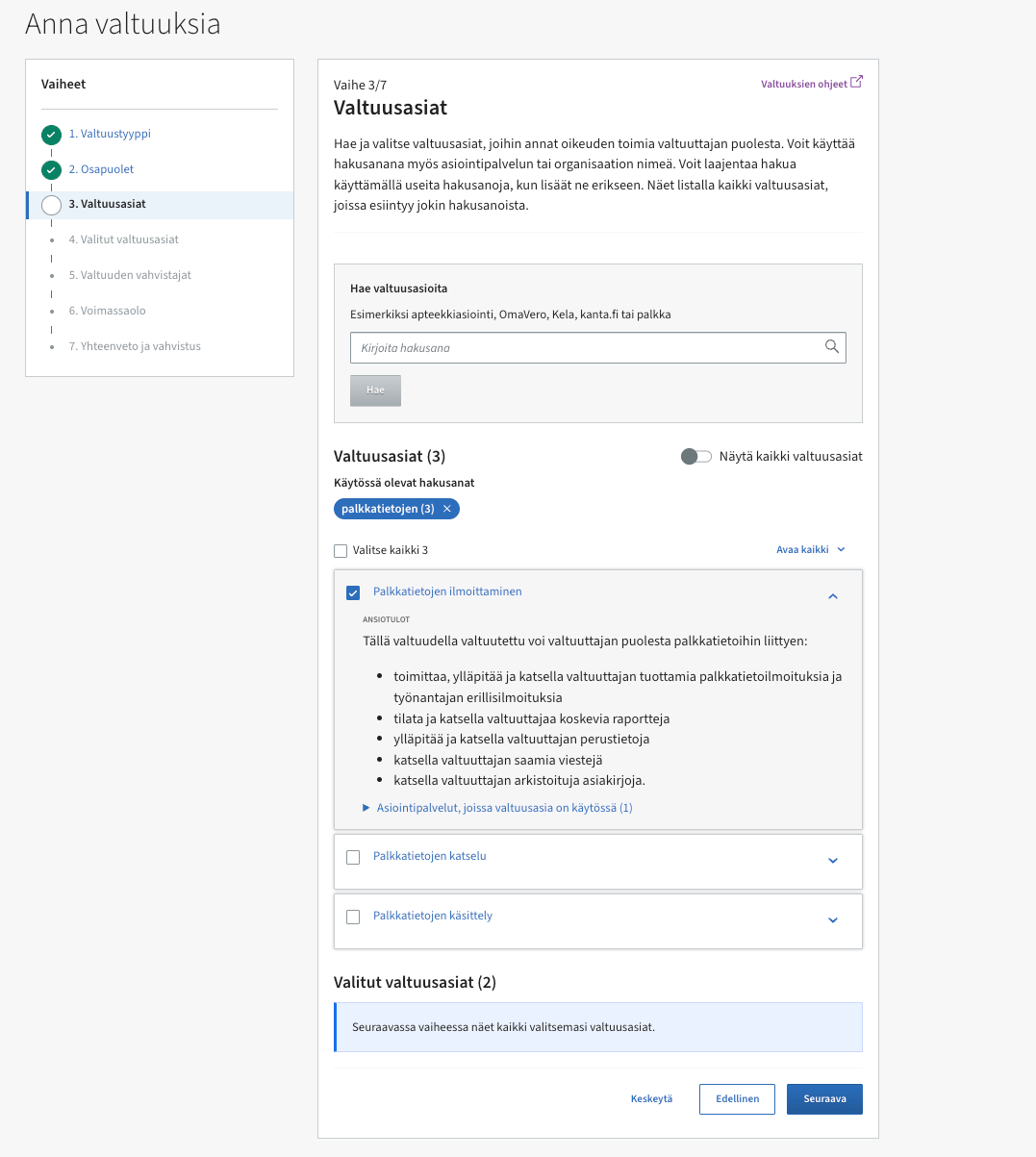
Step 3/7 (Valtuusasiat): search and tick every theme below (the
English title is followed by the exact Finnish title shown when your
Suomi.fi interface is in Finnish). If the wizard is in Finnish, search
using a distinctive word copied verbatim from the Finnish line instead of
translating the English title yourself:
Maintaining information on unemployment insurance contributions Työttömyysvakuutusmaksutietojen ylläpito —
unemployment-insurance contributions and training compensations.
Management of electronic messages Sähköisten viestien hallinnointi — authority
message settings, reading, and sending messages for your company.
Managing of tax affairs Veroasioiden hoito — VAT returns,
tax-account reads, and the other Vero work LAC prepares for you.
Ordering and retrieving records related to the payer’s earnings payment data Maksajan palkkatietoihin liittyvien aineistojen tilaaminen ja noutaminen —
the official machine-readable record of payroll data filed for you.
Processing of log, interface and report data related to income data Tulotietoihin liittyvien loki-, rajapinta- ja ilmoitustietojen käsittely
Processing salary information Palkkatietojen käsittely
Processing TyEL insurance and payment information TyEL-vakuutus- ja -maksutietojen käsittely
Processing TyEL insurance, payment and earnings information TyEL-vakuutus-, maksu- ja ansiotietojen käsittely
Reporting earnings payment data Palkkatietojen ilmoittaminen — payroll
reporting to the Incomes Register.
Reporting, updating, and retrieving tax information via the interface Verotukseen liittyvien tietojen ilmoittaminen, päivittäminen ja hakeminen rajapinnan kautta
Submitting an interface application related to taxation, income and credit information and ordering certificates Verotukseen, tulotietoihin ja luottotietoihin liittyvän rajapintahakemuksen tekeminen ja varmenteiden tilaaminen
The full list lets LAC resolve tax, payroll, pension,
unemployment-insurance, message, and records matters for you without
another Suomi.fi visit later. Every mandate is read or filing authority
only — money never moves without you, and filings always pass a human
review at LAC.
Step 3/7 — search each theme (here “palkkatietojen”) and tick it; repeat for the whole list.
5
Review the selected themes
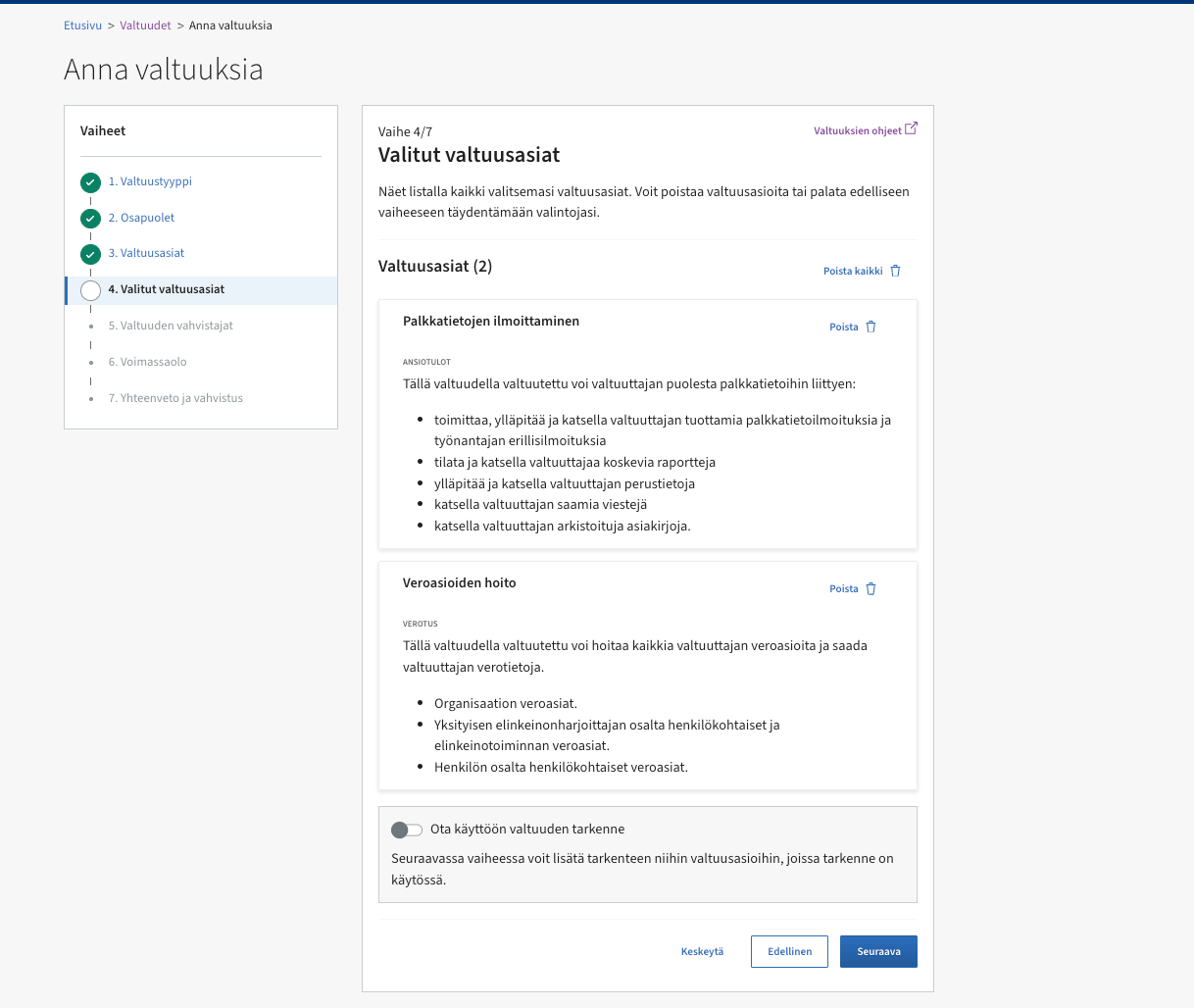
Step 4/7 (Valitut valtuusasiat) lists what you picked — check all
eleven themes are there. Leave the valtuuden tarkenne (mandate
specifier) toggle off.
Step 4/7 — the selected themes (the screenshot shows an older two-theme grant; your list has all eleven).
6
Confirmers
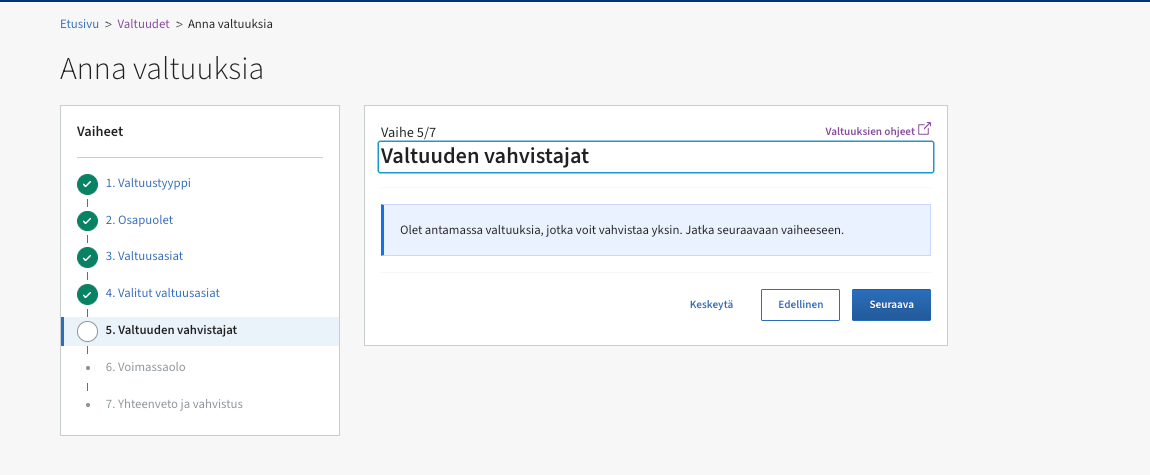
Step 5/7 (Valtuuden vahvistajat): if you can represent the company
alone, Suomi.fi says so — just continue. (If your trade register entry
requires shared representation, Suomi.fi routes you to co-confirmation
here.)
Step 5/7 — confirm alone and continue.
7
Set the validity
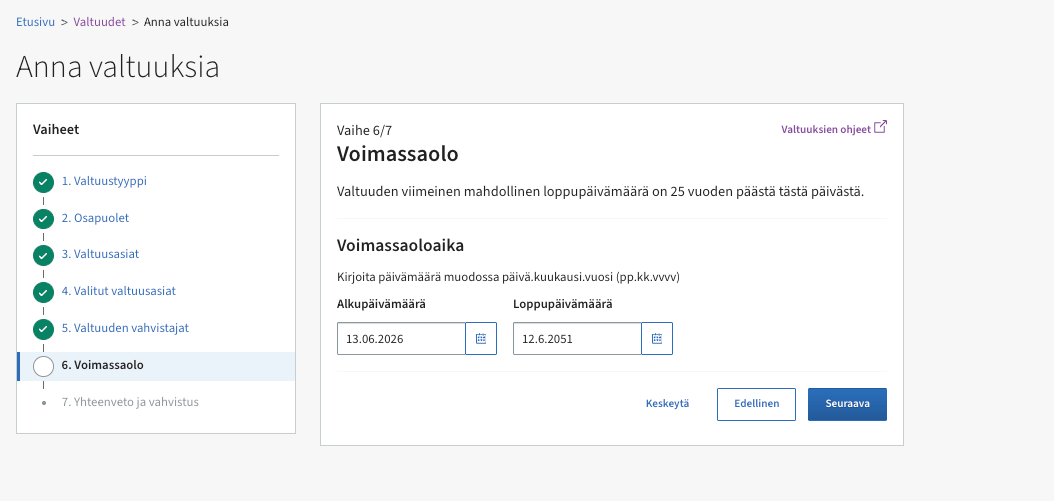
Step 6/7 (Voimassaolo): set the validity period. We suggest the
maximum, 25 years — you can revoke the mandate at any time.
Step 6/7 — validity; the maximum is 25 years from today.
8
Confirm
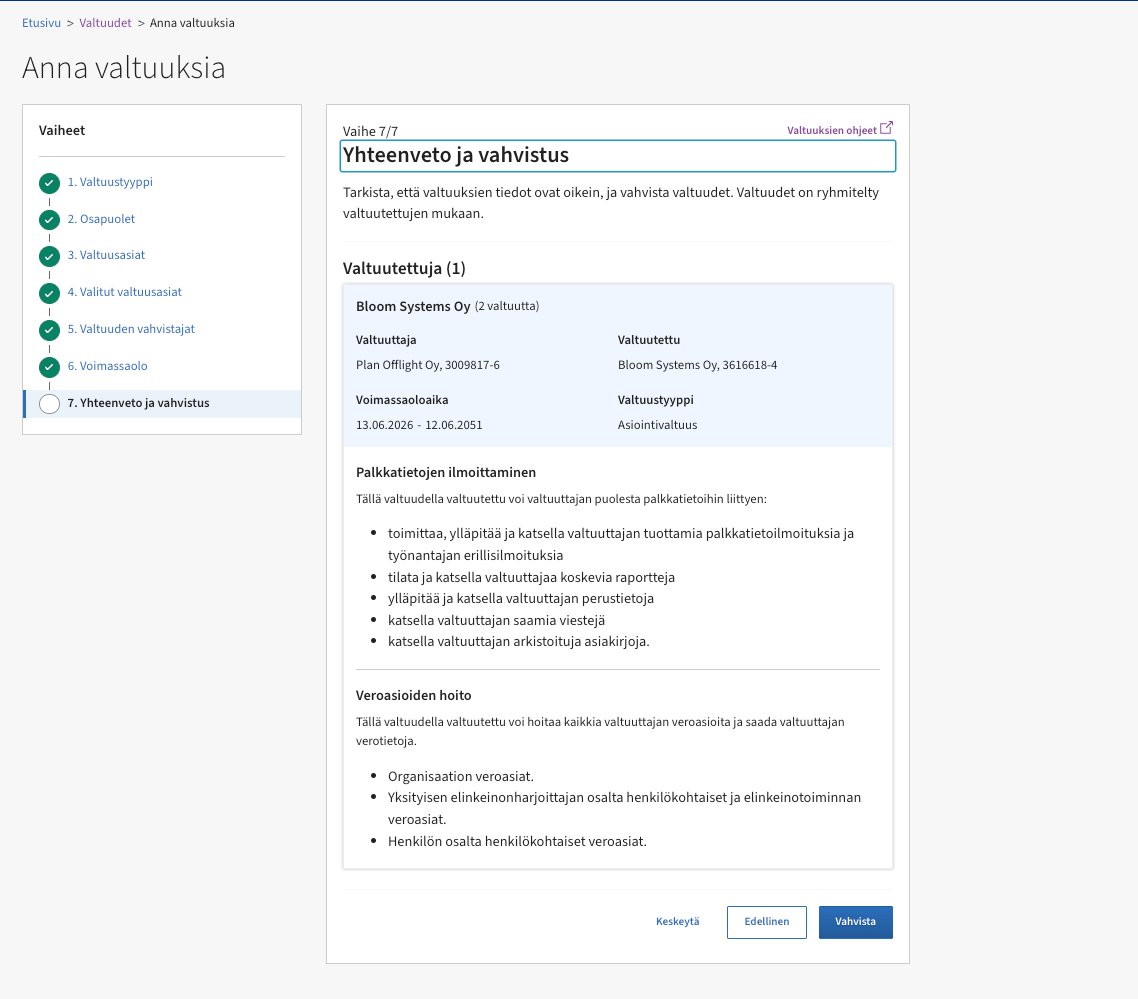
Step 7/7 (Yhteenveto ja vahvistus): check the summary — assignee
Bloom Systems Oy 3616618-4, your themes, the validity — and press
Vahvista (Confirm).
Step 7/7 — summary, then Vahvista.
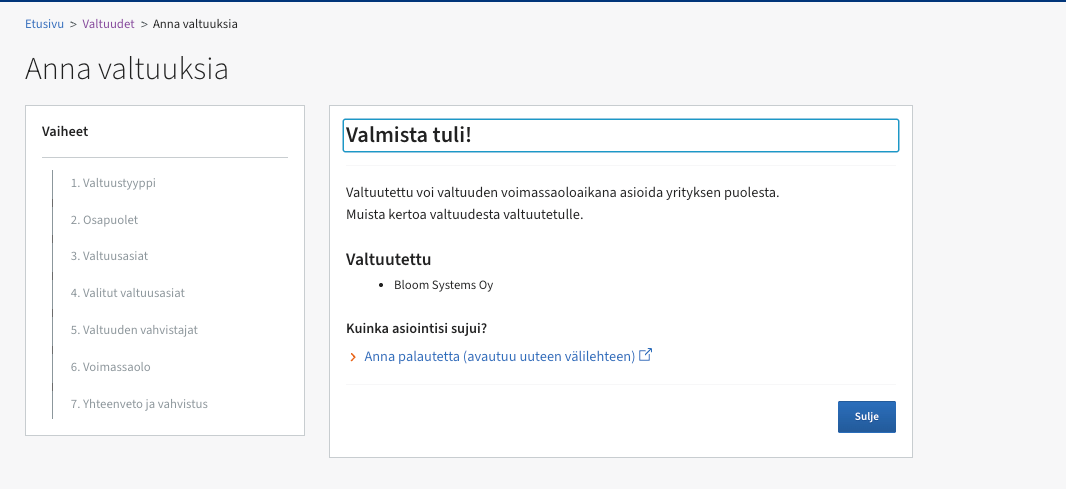
Done — “Valmista tuli!”.
9
Tell us it's done
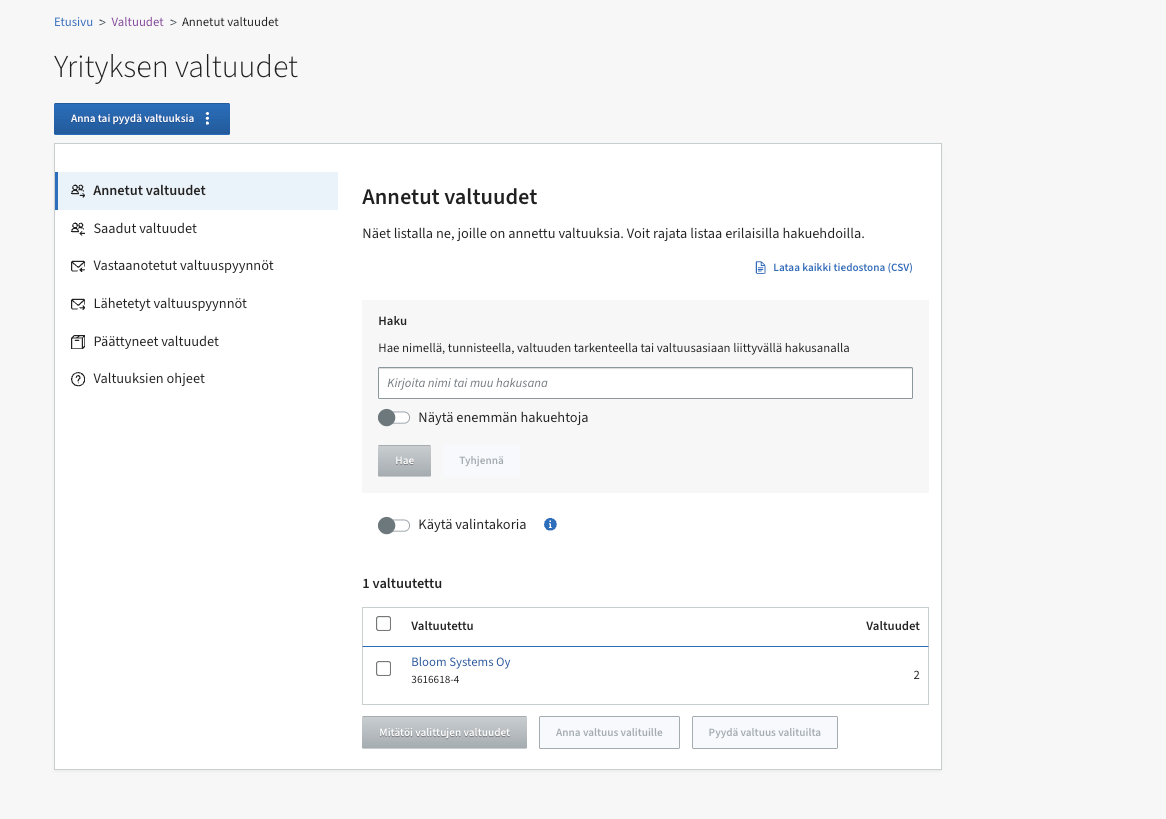
The grants now show under Annetut valtuudet (Granted mandates).
Back in the LAC portal, press
I have granted these mandates on the Suomi.fi onboarding step. We verify
the mandate with the authorities before anything is filed.
You stay in control: the mandate can be revoked at any time in Suomi.fi
e-Authorizations under Annetut valtuudet (Granted mandates). If you revoke
it, LAC can no longer file on your behalf and we’ll reach out about next
steps.
If Suomi.fi says you can’t grant mandates alone (for example the trade
register lists shared representation), Suomi.fi offers a mandate
application flow, or another representative can co-confirm at step 5.
Message us in the portal chat and we’ll walk it through with you.
{"docsConfig":{"theme":"mint","$schema":"https://mintlify.com/docs.json","name":"LAC Developers","description":"Developer documentation for Last Accounting Company customer API and MCP server.","colors":{"primary":"#1aa251","light":"#3ecf74","dark":"#16823f"},"logo":{"light":"https://mintcdn.com/lastaccountingcompany/t6yDKpFsZd7KsB-H/favicon.png?fit=max\u0026auto=format\u0026n=t6yDKpFsZd7KsB-H\u0026q=85\u0026s=6284d1423b8824129348afb245217405","dark":"https://mintcdn.com/lastaccountingcompany/t6yDKpFsZd7KsB-H/favicon.png?fit=max\u0026auto=format\u0026n=t6yDKpFsZd7KsB-H\u0026q=85\u0026s=6284d1423b8824129348afb245217405"},"favicon":"https://mintcdn.com/lastaccountingcompany/t6yDKpFsZd7KsB-H/favicon.png?fit=max\u0026auto=format\u0026n=t6yDKpFsZd7KsB-H\u0026q=85\u0026s=6284d1423b8824129348afb245217405","navbar":{"links":[{"href":"https://app.lastaccountingcompany.com","label":"Portal"}]},"footer":{"links":[{"header":"Last Accounting Company","items":[{"label":"Home","href":"https://lastaccountingcompany.com"},{"label":"Customer portal","href":"https://app.lastaccountingcompany.com"},{"label":"Privacy","href":"https://lastaccountingcompany.com/privacy"},{"label":"Terms","href":"https://lastaccountingcompany.com/terms"}]}]},"contextual":{"options":["copy","view"],"display":"header"},"styling":{"latex":false},"navigation":{"pages":[]}},"deployment":{"deploymentMetadataValue":{"subdomain":"lastaccountingcompany","hasAudioNarration":false,"actualSubdomain":"lastaccountingcompany","customDomains":["docs.lastaccountingcompany.com"],"gitSource":{"type":"github","owner":"the-last-accounting-company","repo":"thelastaccountingcompany","deployBranch":"main","contentDirectory":"developer-docs","isPrivate":true,"mountPath":"","label":""},"chroma":{"collectionId":"863ada8e-d3b9-4da4-a198-8f3328c8d51d","liveDeploymentHistoryId":"6ac89726f69e845f5b7c5fd6","schemaVersion":"v3","latestBuiltDeploymentHistoryId":"6ac89726f69e845f5b7c5fd6"},"entitlements":{},"buildId":"6ac89726f69e845f5b7c5fd6","clientVersion":"0.0.3926","searchFilterCounts":[{"language":"default","tag":"API reference","count":176},{"language":"default","tag":"Endpoints","count":174},{"language":"default","tag":"Invoicing","count":34},{"language":"default","tag":"Connections","count":27},{"language":"default","tag":"Payroll","count":15},{"language":"default","tag":"Accounting","count":14},{"language":"default","tag":"Documents","count":14},{"language":"default","tag":"Payments","count":13},{"language":"default","tag":"Filings","count":9},{"language":"default","tag":"Books","count":8}]},"assistantConfig":{"enableAskAiButton":false,"enableStarterQuestions":false,"enableContextualStarterQuestions":false,"enableAskAiSearchBar":true},"hasChatPermissions":false,"hasWebMcpPermissions":false,"toggles":[{"name":"kill-isr","enabled":true,"variant":{"name":"disabled","enabled":false,"feature_enabled":true},"impressionData":false},{"name":"agent-mintlify-slack","enabled":true,"variant":{"name":"disabled","enabled":false,"feature_enabled":true},"impressionData":false},{"name":"editor-v7-file-tree","enabled":true,"variant":{"name":"disabled","enabled":false,"feature_enabled":true},"impressionData":false},{"name":"agent-integrations-settings","enabled":true,"variant":{"name":"disabled","enabled":false,"feature_enabled":true},"impressionData":false},{"name":"automations-pr-grouping","enabled":true,"variant":{"name":"disabled","enabled":false,"feature_enabled":true},"impressionData":false},{"name":"custom-prefix","enabled":true,"variant":{"name":"disabled","enabled":false,"feature_enabled":true},"impressionData":false},{"name":"analytics-v7","enabled":true,"variant":{"name":"disabled","enabled":false,"feature_enabled":true},"impressionData":false},{"name":"user-flows-analytics","enabled":true,"variant":{"name":"disabled","enabled":false,"feature_enabled":true},"impressionData":false},{"name":"no-publish-flow","enabled":true,"variant":{"name":"disabled","enabled":false,"feature_enabled":true},"impressionData":false},{"name":"workos-onboarding","enabled":true,"variant":{"name":"disabled","enabled":false,"feature_enabled":true},"impressionData":false},{"name":"llms-txt-v2","enabled":true,"variant":{"name":"disabled","enabled":false,"feature_enabled":true},"impressionData":false},{"name":"pause-universal-search-reconcile","enabled":true,"variant":{"name":"disabled","enabled":false,"feature_enabled":true},"impressionData":false},{"name":"snapshot-serving-live","enabled":true,"variant":{"name":"disabled","enabled":false,"feature_enabled":true},"impressionData":false},{"name":"stripTemperatureMiddleware","enabled":true,"variant":{"name":"disabled","enabled":false,"feature_enabled":true},"impressionData":false},{"name":"per-site-search-delta","enabled":true,"variant":{"name":"disabled","enabled":false,"feature_enabled":true},"impressionData":false},{"name":"support-platform-pylon-zendesk","enabled":true,"variant":{"name":"disabled","enabled":false,"feature_enabled":true},"impressionData":false},{"name":"snapshot-serving","enabled":true,"variant":{"name":"disabled","enabled":false,"feature_enabled":true},"impressionData":false},{"name":"instant-rollback","enabled":true,"variant":{"name":"disabled","enabled":false,"feature_enabled":true},"impressionData":false},{"name":"granular-notifications-server","enabled":true,"variant":{"name":"disabled","enabled":false,"feature_enabled":true},"impressionData":false},{"name":"granular-notifications","enabled":true,"variant":{"name":"disabled","enabled":false,"feature_enabled":true},"impressionData":false},{"name":"editor-private-page-search","enabled":true,"variant":{"name":"disabled","enabled":false,"feature_enabled":true},"impressionData":false},{"name":"automations-fable","enabled":true,"variant":{"name":"disabled","enabled":false,"feature_enabled":true},"impressionData":false},{"name":"fixed-ai-action-pricing","enabled":true,"variant":{"name":"disabled","enabled":false,"feature_enabled":true},"impressionData":false},{"name":"automation-resolve-merge-conflict","enabled":true,"variant":{"name":"disabled","enabled":false,"feature_enabled":true},"impressionData":false},{"name":"scoped-publishing","enabled":true,"variant":{"name":"disabled","enabled":false,"feature_enabled":true},"impressionData":false},{"name":"mintql","enabled":true,"variant":{"name":"disabled","enabled":false,"feature_enabled":true},"impressionData":false},{"name":"page-level-analytics","enabled":true,"variant":{"name":"disabled","enabled":false,"feature_enabled":true},"impressionData":false},{"name":"editor-version-history-v2","enabled":true,"variant":{"name":"disabled","enabled":false,"feature_enabled":true},"impressionData":false},{"name":"editor-nav-generations","enabled":true,"variant":{"name":"disabled","enabled":false,"feature_enabled":true},"impressionData":false},{"name":"billing-page-v2","enabled":true,"variant":{"name":"disabled","enabled":false,"feature_enabled":true},"impressionData":false},{"name":"vite-origin","enabled":true,"variant":{"name":"disabled","enabled":false,"feature_enabled":true},"impressionData":false},{"name":"workspace-projects","enabled":true,"variant":{"name":"disabled","enabled":false,"feature_enabled":true},"impressionData":false},{"name":"assistant-v5","enabled":true,"variant":{"name":"disabled","enabled":false,"feature_enabled":true},"impressionData":false},{"name":"byok-sep-25","enabled":true,"variant":{"name":"disabled","enabled":false,"feature_enabled":true},"impressionData":false},{"name":"fork-pr-previews","enabled":true,"variant":{"name":"disabled","enabled":false,"feature_enabled":true},"impressionData":false},{"name":"revalidation-jwt","enabled":true,"variant":{"name":"disabled","enabled":false,"feature_enabled":true},"impressionData":false},{"name":"editor-agent-model-picker","enabled":true,"variant":{"name":"disabled","enabled":false,"feature_enabled":true},"impressionData":false},{"name":"hobby-abuse-scan","enabled":true,"variant":{"name":"disabled","enabled":false,"feature_enabled":true},"impressionData":false},{"name":"dashboard-inbox","enabled":true,"variant":{"name":"disabled","enabled":false,"feature_enabled":true},"impressionData":false}],"isAtlas":false,"googleFontsInlined":false},"customCss":[],"page":{"pagePath":"guides/suomi-fi-mandate","slug":"/guides/suomi-fi-mandate","pageMetadata":{"title":"Grant LAC the Suomi.fi mandate","description":"Step-by-step with screenshots: authorise Last Accounting Company to handle your company's tax matters (and payroll reporting) via Suomi.fi e-Authorizations.","href":"/guides/suomi-fi-mandate"},"description":{"compiledSource":"\"use strict\";\nconst {jsx: _jsx} = arguments[0];\nconst {useMDXComponents: _provideComponents} = arguments[0];\nfunction _createMdxContent(props) {\n const _components = {\n p: \"p\",\n ..._provideComponents(),\n ...props.components\n };\n return _jsx(_components.p, {\n children: \"Step-by-step with screenshots: authorise Last Accounting Company to handle your company’s tax matters (and payroll reporting) via Suomi.fi e-Authorizations.\"\n });\n}\nfunction MDXContent(props = {}) {\n const {wrapper: MDXLayout} = {\n ..._provideComponents(),\n ...props.components\n };\n return MDXLayout ? _jsx(MDXLayout, {\n ...props,\n children: _jsx(_createMdxContent, {\n ...props\n })\n }) : _createMdxContent(props);\n}\nreturn {\n default: MDXContent\n};\n","frontmatter":{},"scope":{}},"pageType":"default","mdx":{"mdxSource":{"compiledSource":"\"use strict\";const{Fragment:_Fragment,jsx:_jsx,jsxs:_jsxs}=arguments[0];const{useMDXComponents:_provideComponents}=arguments[0];function _createMdxContent(props){const _components={a:`a`,em:`em`,li:`li`,ol:`ol`,p:`p`,strong:`strong`,ul:`ul`,..._provideComponents(),...props.components},{Frame,Heading,OptimizedImage,Step,Steps}=_components;if(!Frame)_missingMdxReference(`Frame`,true);if(!Heading)_missingMdxReference(`Heading`,true);if(!OptimizedImage)_missingMdxReference(`OptimizedImage`,true);if(!Step)_missingMdxReference(`Step`,true);if(!Steps)_missingMdxReference(`Steps`,true);return _jsxs(_Fragment,{children:[_jsxs(_components.p,{children:[`For LAC to handle your company’s taxes, payroll, and the reads that make both\nverifiable, your company grants Suomi.fi mandates to our filing entity. Grant\nthe `,_jsx(_components.strong,{children:`full list below in one wizard pass`}),` — it takes about five minutes,\nselecting everything at once means you never have to come back for a missing\nauthorisation, and nothing is ever filed without a human review on our side.`]}),`\n`,_jsx(_components.p,{children:`The Suomi.fi interface is shown in Finnish below; the flow is identical in the\nEnglish UI.`}),`\n`,_jsx(Heading,{level:`2`,id:`what-you-need`,children:`What you need`}),`\n`,_jsxs(_components.ul,{children:[`\n`,_jsx(_components.li,{children:`The right to grant mandates for your company — typically you’re the CEO, or\nhold a registered right to represent the company alone.`}),`\n`,_jsx(_components.li,{children:`Finnish online banking credentials, mobile certificate, or a certificate\ncard for identification.`}),`\n`]}),`\n`,_jsx(Heading,{level:`2`,id:`steps`,children:`Steps`}),`\n`,_jsxs(Steps,{children:[_jsxs(Step,{title:`Open your company's mandates`,children:[_jsxs(_components.p,{children:[`Go to `,_jsx(_components.a,{href:`https://www.suomi.fi/e-authorizations`,children:`suomi.fi/e-authorizations`}),`\n(Finnish: `,_jsx(_components.a,{href:`https://www.suomi.fi/valtuudet`,children:`suomi.fi/valtuudet`}),`), press\n`,_jsx(_components.strong,{children:`Identify yourself`}),`, sign in, and choose to act on behalf of your\ncompany. You land on `,_jsx(_components.strong,{children:`Yrityksen valtuudet`}),` (Company mandates). Press\n`,_jsx(_components.strong,{children:`Anna tai pyydä valtuuksia`}),` → `,_jsx(_components.strong,{children:`Anna valtuuksia`}),` (Grant mandates).`]}),_jsx(Frame,{caption:`Company mandates — start from “Anna tai pyydä valtuuksia”.`,children:_jsx(OptimizedImage,{src:`https://mintcdn.com/lastaccountingcompany/fNTK2xQQ5lLmndAj/images/suomi-fi/01.png?fit=max\u0026auto=format\u0026n=fNTK2xQQ5lLmndAj\u0026q=85\u0026s=e8100fd72190aced55a1be83b33d7a89`,alt:`Suomi.fi company mandates page (Yrityksen valtuudet) with the granted-mandates list and the grant-or-request button`,\"data-og-width\":`1522`,width:`1522`,\"data-og-height\":`1020`,height:`1020`,\"data-path\":`images/suomi-fi/01.png`,\"data-optimize\":`true`,\"data-opv\":`3`,srcset:`https://mintcdn.com/lastaccountingcompany/fNTK2xQQ5lLmndAj/images/suomi-fi/01.png?w=280\u0026fit=max\u0026auto=format\u0026n=fNTK2xQQ5lLmndAj\u0026q=85\u0026s=ddf8c5e3f764f396d5fa1883f50cee1c 280w, https://mintcdn.com/lastaccountingcompany/fNTK2xQQ5lLmndAj/images/suomi-fi/01.png?w=560\u0026fit=max\u0026auto=format\u0026n=fNTK2xQQ5lLmndAj\u0026q=85\u0026s=9c793d7d491524eacf5d69d8e306e6ba 560w, https://mintcdn.com/lastaccountingcompany/fNTK2xQQ5lLmndAj/images/suomi-fi/01.png?w=840\u0026fit=max\u0026auto=format\u0026n=fNTK2xQQ5lLmndAj\u0026q=85\u0026s=3546ef388884908ccc62b0abb9c8cc88 840w, https://mintcdn.com/lastaccountingcompany/fNTK2xQQ5lLmndAj/images/suomi-fi/01.png?w=1100\u0026fit=max\u0026auto=format\u0026n=fNTK2xQQ5lLmndAj\u0026q=85\u0026s=506e165d3b5c7f083364e4c1b6ceb6c5 1100w, https://mintcdn.com/lastaccountingcompany/fNTK2xQQ5lLmndAj/images/suomi-fi/01.png?w=1650\u0026fit=max\u0026auto=format\u0026n=fNTK2xQQ5lLmndAj\u0026q=85\u0026s=3814ec62460754a2862773877faef39d 1650w, https://mintcdn.com/lastaccountingcompany/fNTK2xQQ5lLmndAj/images/suomi-fi/01.png?w=2500\u0026fit=max\u0026auto=format\u0026n=fNTK2xQQ5lLmndAj\u0026q=85\u0026s=d734eee6b5f8dd84f2426ead3a142e77 2500w`})})]}),_jsxs(Step,{title:`Mandate type: Asiointivaltuus`,children:[_jsxs(_components.p,{children:[`Step 1/7 asks for the mandate type. Pick `,_jsx(_components.strong,{children:`Asiointivaltuus`}),` (mandate for\ntransactions) — you’re authorising an accounting firm to act on the\ncompany’s behalf.`]}),_jsx(Frame,{caption:`Step 1/7 — choose Asiointivaltuus.`,children:_jsx(OptimizedImage,{src:`https://mintcdn.com/lastaccountingcompany/fNTK2xQQ5lLmndAj/images/suomi-fi/02.png?fit=max\u0026auto=format\u0026n=fNTK2xQQ5lLmndAj\u0026q=85\u0026s=97943526079816c7f5b4597096985902`,alt:`Suomi.fi grant-mandates step 1 of 7: mandate type selection with Asiointivaltuus selected`,\"data-og-width\":`1309`,width:`1309`,\"data-og-height\":`1176`,height:`1176`,\"data-path\":`images/suomi-fi/02.png`,\"data-optimize\":`true`,\"data-opv\":`3`,srcset:`https://mintcdn.com/lastaccountingcompany/fNTK2xQQ5lLmndAj/images/suomi-fi/02.png?w=280\u0026fit=max\u0026auto=format\u0026n=fNTK2xQQ5lLmndAj\u0026q=85\u0026s=9b66c4b1e6f6dad66ef8dff3c2293f03 280w, https://mintcdn.com/lastaccountingcompany/fNTK2xQQ5lLmndAj/images/suomi-fi/02.png?w=560\u0026fit=max\u0026auto=format\u0026n=fNTK2xQQ5lLmndAj\u0026q=85\u0026s=f2c3f703b9380203dbc2703a7ef55397 560w, https://mintcdn.com/lastaccountingcompany/fNTK2xQQ5lLmndAj/images/suomi-fi/02.png?w=840\u0026fit=max\u0026auto=format\u0026n=fNTK2xQQ5lLmndAj\u0026q=85\u0026s=3d79c4ab26613001faa248bc546a1f56 840w, https://mintcdn.com/lastaccountingcompany/fNTK2xQQ5lLmndAj/images/suomi-fi/02.png?w=1100\u0026fit=max\u0026auto=format\u0026n=fNTK2xQQ5lLmndAj\u0026q=85\u0026s=8837f915f382aa3da40db60eb28fad97 1100w, https://mintcdn.com/lastaccountingcompany/fNTK2xQQ5lLmndAj/images/suomi-fi/02.png?w=1650\u0026fit=max\u0026auto=format\u0026n=fNTK2xQQ5lLmndAj\u0026q=85\u0026s=a70106cbe779be43a4bb69985c8ae9fc 1650w, https://mintcdn.com/lastaccountingcompany/fNTK2xQQ5lLmndAj/images/suomi-fi/02.png?w=2500\u0026fit=max\u0026auto=format\u0026n=fNTK2xQQ5lLmndAj\u0026q=85\u0026s=6083d6145872ace7612754711ef06404 2500w`})})]}),_jsxs(Step,{title:`Name LAC as the assignee`,children:[_jsxs(_components.p,{children:[`Step 2/7 (`,_jsx(_components.strong,{children:`Osapuolet`}),`, parties): under `,_jsx(_components.em,{children:`Lisää valtuutetut`}),`, search by\nbusiness ID and add:`]}),_jsxs(_components.ul,{children:[`\n`,_jsxs(_components.li,{children:[_jsx(_components.strong,{children:`Name:`}),` Bloom Systems Oy (operating as Last Accounting Company)`]}),`\n`,_jsxs(_components.li,{children:[_jsx(_components.strong,{children:`Business ID (Y-tunnus):`}),` 3616618-4`]}),`\n`]}),_jsx(Frame,{caption:`Step 2/7 — add Bloom Systems Oy (3616618-4) as the assignee.`,children:_jsx(OptimizedImage,{src:`https://mintcdn.com/lastaccountingcompany/fNTK2xQQ5lLmndAj/images/suomi-fi/03.png?fit=max\u0026auto=format\u0026n=fNTK2xQQ5lLmndAj\u0026q=85\u0026s=0b3230d46144942d11be0991647b2c64`,alt:`Suomi.fi grant-mandates step 2 of 7: Bloom Systems Oy 3616618-4 added as the authorised party`,\"data-og-width\":`1368`,width:`1368`,\"data-og-height\":`922`,height:`922`,\"data-path\":`images/suomi-fi/03.png`,\"data-optimize\":`true`,\"data-opv\":`3`,srcset:`https://mintcdn.com/lastaccountingcompany/fNTK2xQQ5lLmndAj/images/suomi-fi/03.png?w=280\u0026fit=max\u0026auto=format\u0026n=fNTK2xQQ5lLmndAj\u0026q=85\u0026s=3007aeea78e6bed0401f2d3b39ce789a 280w, https://mintcdn.com/lastaccountingcompany/fNTK2xQQ5lLmndAj/images/suomi-fi/03.png?w=560\u0026fit=max\u0026auto=format\u0026n=fNTK2xQQ5lLmndAj\u0026q=85\u0026s=72ddc2180be04db9e8597d53b44a590a 560w, https://mintcdn.com/lastaccountingcompany/fNTK2xQQ5lLmndAj/images/suomi-fi/03.png?w=840\u0026fit=max\u0026auto=format\u0026n=fNTK2xQQ5lLmndAj\u0026q=85\u0026s=03bbc4334f6cda20392ac823a2533c1d 840w, https://mintcdn.com/lastaccountingcompany/fNTK2xQQ5lLmndAj/images/suomi-fi/03.png?w=1100\u0026fit=max\u0026auto=format\u0026n=fNTK2xQQ5lLmndAj\u0026q=85\u0026s=5bc02b7835048cdf6e3da52ed4c1b236 1100w, https://mintcdn.com/lastaccountingcompany/fNTK2xQQ5lLmndAj/images/suomi-fi/03.png?w=1650\u0026fit=max\u0026auto=format\u0026n=fNTK2xQQ5lLmndAj\u0026q=85\u0026s=4a1a9149217c4f3a5a7f32260228bb26 1650w, https://mintcdn.com/lastaccountingcompany/fNTK2xQQ5lLmndAj/images/suomi-fi/03.png?w=2500\u0026fit=max\u0026auto=format\u0026n=fNTK2xQQ5lLmndAj\u0026q=85\u0026s=005cc1a5e9f3d86a42280dd47e913fc8 2500w`})})]}),_jsxs(Step,{title:`Pick the mandate themes — tick the full list`,children:[_jsxs(_components.p,{children:[`Step 3/7 (`,_jsx(_components.strong,{children:`Valtuusasiat`}),`): search and tick `,_jsx(_components.strong,{children:`every theme below`}),` (the\nEnglish title is followed by the exact Finnish title shown when your\nSuomi.fi interface is in Finnish). If the wizard is in Finnish, search\nusing a distinctive word copied verbatim from the Finnish line instead of\ntranslating the English title yourself:`]}),_jsxs(_components.ol,{children:[`\n`,_jsxs(_components.li,{children:[_jsx(_components.strong,{children:`Maintaining information on unemployment insurance contributions`}),`\n`,_jsx(`br`,{}),_jsx(`span`,{lang:`fi`,children:`Työttömyysvakuutusmaksutietojen ylläpito`}),` —\nunemployment-insurance contributions and training compensations.`]}),`\n`,_jsxs(_components.li,{children:[_jsx(_components.strong,{children:`Management of electronic messages`}),`\n`,_jsx(`br`,{}),_jsx(`span`,{lang:`fi`,children:`Sähköisten viestien hallinnointi`}),` — authority\nmessage settings, reading, and sending messages for your company.`]}),`\n`,_jsxs(_components.li,{children:[_jsx(_components.strong,{children:`Managing of tax affairs`}),`\n`,_jsx(`br`,{}),_jsx(`span`,{lang:`fi`,children:`Veroasioiden hoito`}),` — VAT returns,\ntax-account reads, and the other Vero work LAC prepares for you.`]}),`\n`,_jsxs(_components.li,{children:[_jsx(_components.strong,{children:`Ordering and retrieving records related to the payer’s earnings payment data`}),`\n`,_jsx(`br`,{}),_jsx(`span`,{lang:`fi`,children:`Maksajan palkkatietoihin liittyvien aineistojen tilaaminen ja noutaminen`}),` —\nthe official machine-readable record of payroll data filed for you.`]}),`\n`,_jsxs(_components.li,{children:[_jsx(_components.strong,{children:`Processing of log, interface and report data related to income data`}),`\n`,_jsx(`br`,{}),_jsx(`span`,{lang:`fi`,children:`Tulotietoihin liittyvien loki-, rajapinta- ja ilmoitustietojen käsittely`})]}),`\n`,_jsxs(_components.li,{children:[_jsx(_components.strong,{children:`Processing salary information`}),`\n`,_jsx(`br`,{}),_jsx(`span`,{lang:`fi`,children:`Palkkatietojen käsittely`})]}),`\n`,_jsxs(_components.li,{children:[_jsx(_components.strong,{children:`Processing TyEL insurance and payment information`}),`\n`,_jsx(`br`,{}),_jsx(`span`,{lang:`fi`,children:`TyEL-vakuutus- ja -maksutietojen käsittely`})]}),`\n`,_jsxs(_components.li,{children:[_jsx(_components.strong,{children:`Processing TyEL insurance, payment and earnings information`}),`\n`,_jsx(`br`,{}),_jsx(`span`,{lang:`fi`,children:`TyEL-vakuutus-, maksu- ja ansiotietojen käsittely`})]}),`\n`,_jsxs(_components.li,{children:[_jsx(_components.strong,{children:`Reporting earnings payment data`}),`\n`,_jsx(`br`,{}),_jsx(`span`,{lang:`fi`,children:`Palkkatietojen ilmoittaminen`}),` — payroll\nreporting to the Incomes Register.`]}),`\n`,_jsxs(_components.li,{children:[_jsx(_components.strong,{children:`Reporting, updating, and retrieving tax information via the interface`}),`\n`,_jsx(`br`,{}),_jsx(`span`,{lang:`fi`,children:`Verotukseen liittyvien tietojen ilmoittaminen, päivittäminen ja hakeminen rajapinnan kautta`})]}),`\n`,_jsxs(_components.li,{children:[_jsx(_components.strong,{children:`Submitting an interface application related to taxation, income and credit information and ordering certificates`}),`\n`,_jsx(`br`,{}),_jsx(`span`,{lang:`fi`,children:`Verotukseen, tulotietoihin ja luottotietoihin liittyvän rajapintahakemuksen tekeminen ja varmenteiden tilaaminen`})]}),`\n`]}),_jsx(_components.p,{children:`The full list lets LAC resolve tax, payroll, pension,\nunemployment-insurance, message, and records matters for you without\nanother Suomi.fi visit later. Every mandate is read or filing authority\nonly — money never moves without you, and filings always pass a human\nreview at LAC.`}),_jsx(Frame,{caption:`Step 3/7 — search each theme (here “palkkatietojen”) and tick it; repeat for the whole list.`,children:_jsx(OptimizedImage,{src:`https://mintcdn.com/lastaccountingcompany/fNTK2xQQ5lLmndAj/images/suomi-fi/04.png?fit=max\u0026auto=format\u0026n=fNTK2xQQ5lLmndAj\u0026q=85\u0026s=253e10caf021deb947ac6af8b513e340`,alt:`Suomi.fi grant-mandates step 3 of 7: mandate theme search with Palkkatietojen ilmoittaminen selected`,\"data-og-width\":`1077`,width:`1077`,\"data-og-height\":`1203`,height:`1203`,\"data-path\":`images/suomi-fi/04.png`,\"data-optimize\":`true`,\"data-opv\":`3`,srcset:`https://mintcdn.com/lastaccountingcompany/fNTK2xQQ5lLmndAj/images/suomi-fi/04.png?w=280\u0026fit=max\u0026auto=format\u0026n=fNTK2xQQ5lLmndAj\u0026q=85\u0026s=eaf67f7c29583b28c7afd1ddf3c9dac3 280w, https://mintcdn.com/lastaccountingcompany/fNTK2xQQ5lLmndAj/images/suomi-fi/04.png?w=560\u0026fit=max\u0026auto=format\u0026n=fNTK2xQQ5lLmndAj\u0026q=85\u0026s=8525e9695d35fb0ded0719c2070e9874 560w, https://mintcdn.com/lastaccountingcompany/fNTK2xQQ5lLmndAj/images/suomi-fi/04.png?w=840\u0026fit=max\u0026auto=format\u0026n=fNTK2xQQ5lLmndAj\u0026q=85\u0026s=b3c8771dc423e408128c30d6cd9544b9 840w, https://mintcdn.com/lastaccountingcompany/fNTK2xQQ5lLmndAj/images/suomi-fi/04.png?w=1100\u0026fit=max\u0026auto=format\u0026n=fNTK2xQQ5lLmndAj\u0026q=85\u0026s=93b33f13be46c5bffc101674f81adfca 1100w, https://mintcdn.com/lastaccountingcompany/fNTK2xQQ5lLmndAj/images/suomi-fi/04.png?w=1650\u0026fit=max\u0026auto=format\u0026n=fNTK2xQQ5lLmndAj\u0026q=85\u0026s=429e2317a39f03bddff69a368262b124 1650w, https://mintcdn.com/lastaccountingcompany/fNTK2xQQ5lLmndAj/images/suomi-fi/04.png?w=2500\u0026fit=max\u0026auto=format\u0026n=fNTK2xQQ5lLmndAj\u0026q=85\u0026s=92904e35ff85c9c6eb8798d6f9590192 2500w`})})]}),_jsxs(Step,{title:`Review the selected themes`,children:[_jsxs(_components.p,{children:[`Step 4/7 (`,_jsx(_components.strong,{children:`Valitut valtuusasiat`}),`) lists what you picked — check all\neleven themes are there. Leave the `,_jsx(_components.em,{children:`valtuuden tarkenne`}),` (mandate\nspecifier) toggle off.`]}),_jsx(Frame,{caption:`Step 4/7 — the selected themes (the screenshot shows an older two-theme grant; your list has all eleven).`,children:_jsx(OptimizedImage,{src:`https://mintcdn.com/lastaccountingcompany/fNTK2xQQ5lLmndAj/images/suomi-fi/05.png?fit=max\u0026auto=format\u0026n=fNTK2xQQ5lLmndAj\u0026q=85\u0026s=137067139a09e946b96a254141ec0384`,alt:`Suomi.fi grant-mandates step 4 of 7: selected mandate themes review`,\"data-og-width\":`1218`,width:`1218`,\"data-og-height\":`1028`,height:`1028`,\"data-path\":`images/suomi-fi/05.png`,\"data-optimize\":`true`,\"data-opv\":`3`,srcset:`https://mintcdn.com/lastaccountingcompany/fNTK2xQQ5lLmndAj/images/suomi-fi/05.png?w=280\u0026fit=max\u0026auto=format\u0026n=fNTK2xQQ5lLmndAj\u0026q=85\u0026s=20a3ce1418c91579e6871c3e5f09748c 280w, https://mintcdn.com/lastaccountingcompany/fNTK2xQQ5lLmndAj/images/suomi-fi/05.png?w=560\u0026fit=max\u0026auto=format\u0026n=fNTK2xQQ5lLmndAj\u0026q=85\u0026s=406a488e89f4b56531b8f67e9e02b1f2 560w, https://mintcdn.com/lastaccountingcompany/fNTK2xQQ5lLmndAj/images/suomi-fi/05.png?w=840\u0026fit=max\u0026auto=format\u0026n=fNTK2xQQ5lLmndAj\u0026q=85\u0026s=cd769d4d46efce29e5358ce1404204ff 840w, https://mintcdn.com/lastaccountingcompany/fNTK2xQQ5lLmndAj/images/suomi-fi/05.png?w=1100\u0026fit=max\u0026auto=format\u0026n=fNTK2xQQ5lLmndAj\u0026q=85\u0026s=1081e41b4d585ba5eeb5e70b8f1f54f5 1100w, https://mintcdn.com/lastaccountingcompany/fNTK2xQQ5lLmndAj/images/suomi-fi/05.png?w=1650\u0026fit=max\u0026auto=format\u0026n=fNTK2xQQ5lLmndAj\u0026q=85\u0026s=77cbda84b9caf5a53b9b761643568598 1650w, https://mintcdn.com/lastaccountingcompany/fNTK2xQQ5lLmndAj/images/suomi-fi/05.png?w=2500\u0026fit=max\u0026auto=format\u0026n=fNTK2xQQ5lLmndAj\u0026q=85\u0026s=07f450a12b287440d43f1c53c058f4e8 2500w`})})]}),_jsxs(Step,{title:`Confirmers`,children:[_jsxs(_components.p,{children:[`Step 5/7 (`,_jsx(_components.strong,{children:`Valtuuden vahvistajat`}),`): if you can represent the company\nalone, Suomi.fi says so — just continue. (If your trade register entry\nrequires shared representation, Suomi.fi routes you to co-confirmation\nhere.)`]}),_jsx(Frame,{caption:`Step 5/7 — confirm alone and continue.`,children:_jsx(OptimizedImage,{src:`https://mintcdn.com/lastaccountingcompany/fNTK2xQQ5lLmndAj/images/suomi-fi/06.png?fit=max\u0026auto=format\u0026n=fNTK2xQQ5lLmndAj\u0026q=85\u0026s=71986d2c93c6d788ce98c98a1efe3e80`,alt:`Suomi.fi grant-mandates step 5 of 7: mandate confirmers, confirmable alone`,\"data-og-width\":`1150`,width:`1150`,\"data-og-height\":`475`,height:`475`,\"data-path\":`images/suomi-fi/06.png`,\"data-optimize\":`true`,\"data-opv\":`3`,srcset:`https://mintcdn.com/lastaccountingcompany/fNTK2xQQ5lLmndAj/images/suomi-fi/06.png?w=280\u0026fit=max\u0026auto=format\u0026n=fNTK2xQQ5lLmndAj\u0026q=85\u0026s=f0383f0346fb2fdf8606c7b509588c72 280w, https://mintcdn.com/lastaccountingcompany/fNTK2xQQ5lLmndAj/images/suomi-fi/06.png?w=560\u0026fit=max\u0026auto=format\u0026n=fNTK2xQQ5lLmndAj\u0026q=85\u0026s=7c376244a0a4e9fc94571abc40aa0ca7 560w, https://mintcdn.com/lastaccountingcompany/fNTK2xQQ5lLmndAj/images/suomi-fi/06.png?w=840\u0026fit=max\u0026auto=format\u0026n=fNTK2xQQ5lLmndAj\u0026q=85\u0026s=eb45b216f4b2fff2b44996adcec759fb 840w, https://mintcdn.com/lastaccountingcompany/fNTK2xQQ5lLmndAj/images/suomi-fi/06.png?w=1100\u0026fit=max\u0026auto=format\u0026n=fNTK2xQQ5lLmndAj\u0026q=85\u0026s=4463815f83449bdc46af76ff513db892 1100w, https://mintcdn.com/lastaccountingcompany/fNTK2xQQ5lLmndAj/images/suomi-fi/06.png?w=1650\u0026fit=max\u0026auto=format\u0026n=fNTK2xQQ5lLmndAj\u0026q=85\u0026s=ccd3a883c1114aac04d73b8cab4b259a 1650w, https://mintcdn.com/lastaccountingcompany/fNTK2xQQ5lLmndAj/images/suomi-fi/06.png?w=2500\u0026fit=max\u0026auto=format\u0026n=fNTK2xQQ5lLmndAj\u0026q=85\u0026s=db040eaf0dbaad4d41c168f46d27c07c 2500w`})})]}),_jsxs(Step,{title:`Set the validity`,children:[_jsxs(_components.p,{children:[`Step 6/7 (`,_jsx(_components.strong,{children:`Voimassaolo`}),`): set the validity period. We suggest the\nmaximum, 25 years — you can revoke the mandate at any time.`]}),_jsx(Frame,{caption:`Step 6/7 — validity; the maximum is 25 years from today.`,children:_jsx(OptimizedImage,{src:`https://mintcdn.com/lastaccountingcompany/fNTK2xQQ5lLmndAj/images/suomi-fi/07.png?fit=max\u0026auto=format\u0026n=fNTK2xQQ5lLmndAj\u0026q=85\u0026s=8b8faa9ade057147cc09c1a56e81fe34`,alt:`Suomi.fi grant-mandates step 6 of 7: validity period start and end dates`,\"data-og-width\":`1054`,width:`1054`,\"data-og-height\":`501`,height:`501`,\"data-path\":`images/suomi-fi/07.png`,\"data-optimize\":`true`,\"data-opv\":`3`,srcset:`https://mintcdn.com/lastaccountingcompany/fNTK2xQQ5lLmndAj/images/suomi-fi/07.png?w=280\u0026fit=max\u0026auto=format\u0026n=fNTK2xQQ5lLmndAj\u0026q=85\u0026s=d00cc2ae0747bb0be51de44aa0646952 280w, https://mintcdn.com/lastaccountingcompany/fNTK2xQQ5lLmndAj/images/suomi-fi/07.png?w=560\u0026fit=max\u0026auto=format\u0026n=fNTK2xQQ5lLmndAj\u0026q=85\u0026s=5c46a4025bc5f2a493981f1e4a0154ff 560w, https://mintcdn.com/lastaccountingcompany/fNTK2xQQ5lLmndAj/images/suomi-fi/07.png?w=840\u0026fit=max\u0026auto=format\u0026n=fNTK2xQQ5lLmndAj\u0026q=85\u0026s=acb36f4f7a42e22083d64c79c1602b61 840w, https://mintcdn.com/lastaccountingcompany/fNTK2xQQ5lLmndAj/images/suomi-fi/07.png?w=1100\u0026fit=max\u0026auto=format\u0026n=fNTK2xQQ5lLmndAj\u0026q=85\u0026s=42e9ced6f7619bbfaa14df9a6970af18 1100w, https://mintcdn.com/lastaccountingcompany/fNTK2xQQ5lLmndAj/images/suomi-fi/07.png?w=1650\u0026fit=max\u0026auto=format\u0026n=fNTK2xQQ5lLmndAj\u0026q=85\u0026s=e28d69c63f91df01ada05265d053df04 1650w, https://mintcdn.com/lastaccountingcompany/fNTK2xQQ5lLmndAj/images/suomi-fi/07.png?w=2500\u0026fit=max\u0026auto=format\u0026n=fNTK2xQQ5lLmndAj\u0026q=85\u0026s=4493e309d284995d3a89f2a00f4c3888 2500w`})})]}),_jsxs(Step,{title:`Confirm`,children:[_jsxs(_components.p,{children:[`Step 7/7 (`,_jsx(_components.strong,{children:`Yhteenveto ja vahvistus`}),`): check the summary — assignee\nBloom Systems Oy 3616618-4, your themes, the validity — and press\n`,_jsx(_components.strong,{children:`Vahvista`}),` (Confirm).`]}),_jsx(Frame,{caption:`Step 7/7 — summary, then Vahvista.`,children:_jsx(OptimizedImage,{src:`https://mintcdn.com/lastaccountingcompany/fNTK2xQQ5lLmndAj/images/suomi-fi/08.png?fit=max\u0026auto=format\u0026n=fNTK2xQQ5lLmndAj\u0026q=85\u0026s=2a38c27926545dc9b7602d48c1e94b31`,alt:`Suomi.fi grant-mandates step 7 of 7: summary and confirmation with selected mandate themes listed`,\"data-og-width\":`1138`,width:`1138`,\"data-og-height\":`999`,height:`999`,\"data-path\":`images/suomi-fi/08.png`,\"data-optimize\":`true`,\"data-opv\":`3`,srcset:`https://mintcdn.com/lastaccountingcompany/fNTK2xQQ5lLmndAj/images/suomi-fi/08.png?w=280\u0026fit=max\u0026auto=format\u0026n=fNTK2xQQ5lLmndAj\u0026q=85\u0026s=a753eb507777b4b0bf6e7d3baced21ba 280w, https://mintcdn.com/lastaccountingcompany/fNTK2xQQ5lLmndAj/images/suomi-fi/08.png?w=560\u0026fit=max\u0026auto=format\u0026n=fNTK2xQQ5lLmndAj\u0026q=85\u0026s=f7324903c02999cbdde7030d03e634b7 560w, https://mintcdn.com/lastaccountingcompany/fNTK2xQQ5lLmndAj/images/suomi-fi/08.png?w=840\u0026fit=max\u0026auto=format\u0026n=fNTK2xQQ5lLmndAj\u0026q=85\u0026s=07581db77d9badc07faf0a0fb308b28d 840w, https://mintcdn.com/lastaccountingcompany/fNTK2xQQ5lLmndAj/images/suomi-fi/08.png?w=1100\u0026fit=max\u0026auto=format\u0026n=fNTK2xQQ5lLmndAj\u0026q=85\u0026s=cf91fa8f451bbfe97d4c2d8b0172612b 1100w, https://mintcdn.com/lastaccountingcompany/fNTK2xQQ5lLmndAj/images/suomi-fi/08.png?w=1650\u0026fit=max\u0026auto=format\u0026n=fNTK2xQQ5lLmndAj\u0026q=85\u0026s=bbddfc078f2565c45d10e61c1603ee3e 1650w, https://mintcdn.com/lastaccountingcompany/fNTK2xQQ5lLmndAj/images/suomi-fi/08.png?w=2500\u0026fit=max\u0026auto=format\u0026n=fNTK2xQQ5lLmndAj\u0026q=85\u0026s=b55b26b26a3859fb2729a638516df09f 2500w`})}),_jsx(Frame,{caption:`Done — “Valmista tuli!”.`,children:_jsx(OptimizedImage,{src:`https://mintcdn.com/lastaccountingcompany/fNTK2xQQ5lLmndAj/images/suomi-fi/09.png?fit=max\u0026auto=format\u0026n=fNTK2xQQ5lLmndAj\u0026q=85\u0026s=a1546c2f078789781bfda625d8eb7ea5`,alt:`Suomi.fi confirmation page after granting the mandates`,\"data-og-width\":`1066`,width:`1066`,\"data-og-height\":`489`,height:`489`,\"data-path\":`images/suomi-fi/09.png`,\"data-optimize\":`true`,\"data-opv\":`3`,srcset:`https://mintcdn.com/lastaccountingcompany/fNTK2xQQ5lLmndAj/images/suomi-fi/09.png?w=280\u0026fit=max\u0026auto=format\u0026n=fNTK2xQQ5lLmndAj\u0026q=85\u0026s=23d19216ea53f36bdd13243d8c7d77ef 280w, https://mintcdn.com/lastaccountingcompany/fNTK2xQQ5lLmndAj/images/suomi-fi/09.png?w=560\u0026fit=max\u0026auto=format\u0026n=fNTK2xQQ5lLmndAj\u0026q=85\u0026s=46903ff9a1c4e9d4f8d33fce905307e2 560w, https://mintcdn.com/lastaccountingcompany/fNTK2xQQ5lLmndAj/images/suomi-fi/09.png?w=840\u0026fit=max\u0026auto=format\u0026n=fNTK2xQQ5lLmndAj\u0026q=85\u0026s=dfd94b2422413fe38a63161fb9f4cf2b 840w, https://mintcdn.com/lastaccountingcompany/fNTK2xQQ5lLmndAj/images/suomi-fi/09.png?w=1100\u0026fit=max\u0026auto=format\u0026n=fNTK2xQQ5lLmndAj\u0026q=85\u0026s=d748247645aff855cc92fd626a864bdc 1100w, https://mintcdn.com/lastaccountingcompany/fNTK2xQQ5lLmndAj/images/suomi-fi/09.png?w=1650\u0026fit=max\u0026auto=format\u0026n=fNTK2xQQ5lLmndAj\u0026q=85\u0026s=c55bb352eef44861ddba633118e3b32e 1650w, https://mintcdn.com/lastaccountingcompany/fNTK2xQQ5lLmndAj/images/suomi-fi/09.png?w=2500\u0026fit=max\u0026auto=format\u0026n=fNTK2xQQ5lLmndAj\u0026q=85\u0026s=f62a07d8f2cc2b8b860b8163c9e4f307 2500w`})})]}),_jsxs(Step,{title:`Tell us it's done`,children:[_jsxs(_components.p,{children:[`The grants now show under `,_jsx(_components.strong,{children:`Annetut valtuudet`}),` (Granted mandates).\nBack in the `,_jsx(_components.a,{href:`https://app.lastaccountingcompany.com`,children:`LAC portal`}),`, press\n`,_jsx(_components.strong,{children:`I have granted these mandates`}),` on the Suomi.fi onboarding step. We verify\nthe mandate with the authorities before anything is filed.`]}),_jsx(Frame,{caption:`Granted mandates now list Bloom Systems Oy.`,children:_jsx(OptimizedImage,{src:`https://mintcdn.com/lastaccountingcompany/fNTK2xQQ5lLmndAj/images/suomi-fi/10.png?fit=max\u0026auto=format\u0026n=fNTK2xQQ5lLmndAj\u0026q=85\u0026s=674dd51b930683d921cb2b758aabf960`,alt:`Suomi.fi company mandates page showing Bloom Systems Oy with granted mandates`,\"data-og-width\":`1166`,width:`1166`,\"data-og-height\":`819`,height:`819`,\"data-path\":`images/suomi-fi/10.png`,\"data-optimize\":`true`,\"data-opv\":`3`,srcset:`https://mintcdn.com/lastaccountingcompany/fNTK2xQQ5lLmndAj/images/suomi-fi/10.png?w=280\u0026fit=max\u0026auto=format\u0026n=fNTK2xQQ5lLmndAj\u0026q=85\u0026s=20900dff414d5e708ef6564337f9e46c 280w, https://mintcdn.com/lastaccountingcompany/fNTK2xQQ5lLmndAj/images/suomi-fi/10.png?w=560\u0026fit=max\u0026auto=format\u0026n=fNTK2xQQ5lLmndAj\u0026q=85\u0026s=d26cde80b12b4e522c09f64f948b1d20 560w, https://mintcdn.com/lastaccountingcompany/fNTK2xQQ5lLmndAj/images/suomi-fi/10.png?w=840\u0026fit=max\u0026auto=format\u0026n=fNTK2xQQ5lLmndAj\u0026q=85\u0026s=736af617974cb4edf4421233130479bd 840w, https://mintcdn.com/lastaccountingcompany/fNTK2xQQ5lLmndAj/images/suomi-fi/10.png?w=1100\u0026fit=max\u0026auto=format\u0026n=fNTK2xQQ5lLmndAj\u0026q=85\u0026s=dd85a3d24cb593a211c8da37724abfdf 1100w, https://mintcdn.com/lastaccountingcompany/fNTK2xQQ5lLmndAj/images/suomi-fi/10.png?w=1650\u0026fit=max\u0026auto=format\u0026n=fNTK2xQQ5lLmndAj\u0026q=85\u0026s=82ab7672e7920539eb67de51c19f914b 1650w, https://mintcdn.com/lastaccountingcompany/fNTK2xQQ5lLmndAj/images/suomi-fi/10.png?w=2500\u0026fit=max\u0026auto=format\u0026n=fNTK2xQQ5lLmndAj\u0026q=85\u0026s=1263d03cc0aea5f7f46ff8a107394440 2500w`})})]})]}),`\n`,_jsx(Heading,{level:`2`,id:`revoking`,children:`Revoking`}),`\n`,_jsxs(_components.p,{children:[`You stay in control: the mandate can be revoked at any time in Suomi.fi\ne-Authorizations under `,_jsx(_components.strong,{children:`Annetut valtuudet`}),` (Granted mandates). If you revoke\nit, LAC can no longer file on your behalf and we’ll reach out about next\nsteps.`]}),`\n`,_jsx(Heading,{level:`2`,id:`trouble`,children:`Trouble?`}),`\n`,_jsxs(_components.p,{children:[`If Suomi.fi says you can’t grant mandates alone (for example the trade\nregister lists shared representation), Suomi.fi offers a `,_jsx(_components.strong,{children:`mandate\napplication`}),` flow, or another representative can co-confirm at step 5.\nMessage us in the portal chat and we’ll walk it through with you.`]})]})}function MDXContent(props={}){const{wrapper:MDXLayout}={..._provideComponents(),...props.components};return MDXLayout?_jsx(MDXLayout,{...props,children:_jsx(_createMdxContent,{...props})}):_createMdxContent(props)}return{default:MDXContent};function _missingMdxReference(id,component){throw new Error(`Expected `+(component?`component`:`object`)+\" `\"+id+\"` to be defined: you likely forgot to import, pass, or provide it.\")}","frontmatter":{},"scope":{"config":{},"pageMetadata":{"title":"Grant LAC the Suomi.fi mandate","description":"Step-by-step with screenshots: authorise Last Accounting Company to handle your company's tax matters (and payroll reporting) via Suomi.fi e-Authorizations.","href":"/guides/suomi-fi-mandate"}}},"mdxSourceWithNoJs":null},"mdxExtracts":{"tableOfContents":[{"title":"What you need","slug":"what-you-need","depth":2,"children":[]},{"title":"Steps","slug":"steps","depth":2,"children":[]},{"title":"Revoking","slug":"revoking","depth":2,"children":[]},{"title":"Trouble?","slug":"trouble","depth":2,"children":[]}],"codeExamples":{}},"jsLinks":[],"subdomain":"lastaccountingcompany","siteName":"LAC Developers","title":"Grant LAC the Suomi.fi mandate - LAC Developers","navMaps":{"firstHrefInVersion":{},"firstHrefInLanguage":{}},"lastModified":"2026-07-20T10:13:08.383Z","originalFileLocation":"guides/suomi-fi-mandate.mdx"},"headHtml":"\u003cscript data-mint-head>(function(){var d=document.documentElement,p=null;if(!p){try{p=localStorage.getItem(\"isDarkMode\")}catch(e){}if(p==='true')p='dark';else if(p==='false')p='light';if(p!=='light'\u0026\u0026p!=='dark'\u0026\u0026p!=='system')p=\"system\"}var r=p==='system'?(matchMedia(\"(prefers-color-scheme: dark)\").matches?'dark':'light'):p;d.classList.remove(r==='dark'?'light':'dark');d.classList.add(r);d.setAttribute(\"data-theme-preference\",p)})();\u003c/script>\u003cmeta data-mint-head name=\"description\" content=\"Step-by-step with screenshots: authorise Last Accounting Company to handle your company\u0026#x27;s tax matters (and payroll reporting) via Suomi.fi e-Authorizations.\">\u003cmeta data-mint-head name=\"application-name\" content=\"LAC Developers\">\u003cmeta data-mint-head name=\"generator\" content=\"Mintlify\">\u003clink data-mint-head rel=\"icon\" type=\"image/png\" sizes=\"192x192\" href=\"/mintlify-assets/_mintlify/favicons/lastaccountingcompany/p6PlJEp_YIYYenvU/_generated/favicon/android-chrome-192x192.png\" media=\"(prefers-color-scheme: light)\">\u003clink data-mint-head rel=\"apple-touch-icon\" type=\"image/png\" sizes=\"180x180\" href=\"/mintlify-assets/_mintlify/favicons/lastaccountingcompany/p6PlJEp_YIYYenvU/_generated/favicon/apple-touch-icon.png\">\u003clink data-mint-head rel=\"icon\" type=\"image/png\" sizes=\"16x16\" href=\"/mintlify-assets/_mintlify/favicons/lastaccountingcompany/p6PlJEp_YIYYenvU/_generated/favicon/favicon-16x16.png\" media=\"(prefers-color-scheme: light)\">\u003clink data-mint-head rel=\"icon\" type=\"image/png\" sizes=\"32x32\" href=\"/mintlify-assets/_mintlify/favicons/lastaccountingcompany/p6PlJEp_YIYYenvU/_generated/favicon/favicon-32x32.png\" media=\"(prefers-color-scheme: light)\">\u003clink data-mint-head rel=\"shortcut icon\" type=\"image/x-icon\" href=\"/mintlify-assets/_mintlify/favicons/lastaccountingcompany/p6PlJEp_YIYYenvU/_generated/favicon/favicon.ico\" media=\"(prefers-color-scheme: light)\">\u003clink data-mint-head rel=\"icon\" type=\"image/png\" sizes=\"192x192\" href=\"/mintlify-assets/_mintlify/favicons/lastaccountingcompany/p6PlJEp_YIYYenvU/_generated/favicon-dark/android-chrome-192x192.png\" media=\"(prefers-color-scheme: dark)\">\u003clink data-mint-head rel=\"icon\" type=\"image/png\" sizes=\"16x16\" href=\"/mintlify-assets/_mintlify/favicons/lastaccountingcompany/p6PlJEp_YIYYenvU/_generated/favicon-dark/favicon-16x16.png\" media=\"(prefers-color-scheme: dark)\">\u003clink data-mint-head rel=\"icon\" type=\"image/png\" sizes=\"32x32\" href=\"/mintlify-assets/_mintlify/favicons/lastaccountingcompany/p6PlJEp_YIYYenvU/_generated/favicon-dark/favicon-32x32.png\" media=\"(prefers-color-scheme: dark)\">\u003clink data-mint-head rel=\"shortcut icon\" type=\"image/x-icon\" href=\"/mintlify-assets/_mintlify/favicons/lastaccountingcompany/p6PlJEp_YIYYenvU/_generated/favicon-dark/favicon.ico\" media=\"(prefers-color-scheme: dark)\">\u003cmeta data-mint-head property=\"og:title\" content=\"Grant LAC the Suomi.fi mandate - LAC Developers\">\u003cmeta data-mint-head property=\"og:description\" content=\"Step-by-step with screenshots: authorise Last Accounting Company to handle your company\u0026#x27;s tax matters (and payroll reporting) via Suomi.fi e-Authorizations.\">\u003cmeta data-mint-head property=\"og:site_name\" content=\"LAC Developers\">\u003cmeta data-mint-head property=\"og:url\" content=\"https://docs.lastaccountingcompany.com/guides/suomi-fi-mandate\">\u003cmeta data-mint-head property=\"og:type\" content=\"website\">\u003cmeta data-mint-head property=\"og:image\" content=\"https://lastaccountingcompany.mintlify.app/_mintlify/api/og/v2?division=Guides\u0026amp;title=Grant+LAC+the+Suomi.fi+mandate\u0026amp;description=Step-by-step+with+screenshots%3A+authorise+Last+Accounting+Company+to+handle+your+company%27s+tax+matters+%28and+payroll+reporting%29+via+Suomi.fi+e-Authorizations.\u0026amp;theme=9104f07dbaed6a8d42010578\u0026amp;signature=0e895c9de58ab7ddd4ec9e51a0f1473db16d382191b1f1cf3542142f09335d0b\">\u003cmeta data-mint-head property=\"og:image:width\" content=\"1200\">\u003cmeta data-mint-head property=\"og:image:height\" content=\"630\">\u003cmeta data-mint-head name=\"twitter:card\" content=\"summary_large_image\">\u003cmeta data-mint-head name=\"twitter:title\" content=\"Grant LAC the Suomi.fi mandate - LAC Developers\">\u003cmeta data-mint-head name=\"twitter:description\" content=\"Step-by-step with screenshots: authorise Last Accounting Company to handle your company\u0026#x27;s tax matters (and payroll reporting) via Suomi.fi e-Authorizations.\">\u003cmeta data-mint-head name=\"twitter:image\" content=\"https://lastaccountingcompany.mintlify.app/_mintlify/api/og/v2?division=Guides\u0026amp;title=Grant+LAC+the+Suomi.fi+mandate\u0026amp;description=Step-by-step+with+screenshots%3A+authorise+Last+Accounting+Company+to+handle+your+company%27s+tax+matters+%28and+payroll+reporting%29+via+Suomi.fi+e-Authorizations.\u0026amp;theme=9104f07dbaed6a8d42010578\u0026amp;signature=0e895c9de58ab7ddd4ec9e51a0f1473db16d382191b1f1cf3542142f09335d0b\">\u003cmeta data-mint-head name=\"twitter:image:width\" content=\"1200\">\u003cmeta data-mint-head name=\"twitter:image:height\" content=\"630\">\u003cmeta data-mint-head name=\"msapplication-config\" content=\"/mintlify-assets/_mintlify/favicons/lastaccountingcompany/p6PlJEp_YIYYenvU/_generated/favicon/browserconfig.xml\">\u003cmeta data-mint-head name=\"apple-mobile-web-app-title\" content=\"LAC Developers\">\u003cmeta data-mint-head name=\"msapplication-TileColor\" content=\"#1aa251\">\u003clink data-mint-head rel=\"canonical\" href=\"https://docs.lastaccountingcompany.com/guides/suomi-fi-mandate\">\u003clink data-mint-head rel=\"alternate\" type=\"application/xml\" href=\"/sitemap.xml\">\u003clink data-mint-head rel=\"alternate\" type=\"text/markdown\" href=\"/guides/suomi-fi-mandate.md\">\u003cscript data-mint-head type=\"application/ld+json\">{\"@context\":\"https://schema.org\",\"@graph\":[{\"@type\":\"Organization\",\"@id\":\"https://docs.lastaccountingcompany.com/#organization\",\"name\":\"LAC Developers\",\"url\":\"https://docs.lastaccountingcompany.com\",\"logo\":{\"@type\":\"ImageObject\",\"url\":\"https://mintcdn.com/lastaccountingcompany/t6yDKpFsZd7KsB-H/favicon.png?fit=max\u0026auto=format\u0026n=t6yDKpFsZd7KsB-H\u0026q=85\u0026s=6284d1423b8824129348afb245217405\"}},{\"@type\":\"WebSite\",\"@id\":\"https://docs.lastaccountingcompany.com#website\",\"name\":\"LAC Developers\",\"url\":\"https://docs.lastaccountingcompany.com\",\"publisher\":{\"@id\":\"https://docs.lastaccountingcompany.com/#organization\"}},{\"@type\":\"WebPage\",\"@id\":\"https://docs.lastaccountingcompany.com/guides/suomi-fi-mandate#webpage\",\"url\":\"https://docs.lastaccountingcompany.com/guides/suomi-fi-mandate\",\"name\":\"Grant LAC the Suomi.fi mandate\",\"description\":\"Step-by-step with screenshots: authorise Last Accounting Company to handle your company's tax matters (and payroll reporting) via Suomi.fi e-Authorizations.\",\"dateModified\":\"2026-07-20T10:13:08.383Z\",\"isPartOf\":{\"@id\":\"https://docs.lastaccountingcompany.com#website\"},\"breadcrumb\":{\"@id\":\"https://docs.lastaccountingcompany.com/guides/suomi-fi-mandate#breadcrumb\"}},{\"@type\":\"BreadcrumbList\",\"@id\":\"https://docs.lastaccountingcompany.com/guides/suomi-fi-mandate#breadcrumb\",\"itemListElement\":[{\"@type\":\"ListItem\",\"position\":1,\"name\":\"Guides\",\"item\":\"https://docs.lastaccountingcompany.com/guides/read-permissions\"},{\"@type\":\"ListItem\",\"position\":2,\"name\":\"Grant LAC the Suomi.fi mandate\",\"item\":\"https://docs.lastaccountingcompany.com/guides/suomi-fi-mandate\"}]},{\"@type\":[\"Article\",\"TechArticle\"],\"@id\":\"https://docs.lastaccountingcompany.com/guides/suomi-fi-mandate#article\",\"headline\":\"Grant LAC the Suomi.fi mandate\",\"name\":\"Grant LAC the Suomi.fi mandate\",\"description\":\"Step-by-step with screenshots: authorise Last Accounting Company to handle your company's tax matters (and payroll reporting) via Suomi.fi e-Authorizations.\",\"url\":\"https://docs.lastaccountingcompany.com/guides/suomi-fi-mandate\",\"mainEntityOfPage\":{\"@id\":\"https://docs.lastaccountingcompany.com/guides/suomi-fi-mandate#webpage\"},\"dateModified\":\"2026-07-20T10:13:08.383Z\",\"publisher\":{\"@id\":\"https://docs.lastaccountingcompany.com/#organization\"},\"isPartOf\":{\"@id\":\"https://docs.lastaccountingcompany.com#website\"}}]}\u003c/script>\u003cscript data-mint-head type=\"application/ld+json\">{\"@context\":\"https://schema.org\",\"@type\":\"WebSite\",\"name\":\"LAC Developers\",\"creator\":{\"@type\":\"Organization\",\"name\":\"Mintlify\",\"url\":\"https://mintlify.com\"}}\u003c/script>","siteName":"LAC Developers","nav":{"global":null,"tabs":[{"tab":"Documentation","groups":[{"group":"Getting started","pages":[{"title":"Getting started","href":""}]},{"group":"Guides","pages":[{"title":"Enable read permissions","description":"Give LAC complete read-only access to your existing accounting and bank data in one pass.","href":"/guides/read-permissions"},{"title":"Grant LAC the Suomi.fi mandate","href":"/guides/suomi-fi-mandate"},{"title":"Invoice for a partner","description":"Create and send an invoice where a partner company is the legal seller and payee.","href":"/guides/partner-invoices"}]},{"group":"MCP","pages":[{"title":"MCP server","href":"/mcp-server"}]}]},{"tab":"API reference","pages":[{"title":"API reference","href":"/api-reference"}]}]},"title":"Grant LAC the Suomi.fi mandate - LAC Developers","buildId":"dpl_9DauxEjb9gzCtcuhPQFbquJvx7FJ","deploymentId":"dpl_9DauxEjb9gzCtcuhPQFbquJvx7FJ","dynamics":["07c022d89b","a74be98ba7"],"chunks":["Frame-DpBmNN95.js","DynamicMarkdown-BY_qDhTn.js","zoom-image-lightbox-D4WcYaf4.js","PlusIcon-CwhPVjTe.js","lightbox-handle-r17bVUz3.js"]}